Mobile Ticketing Guide
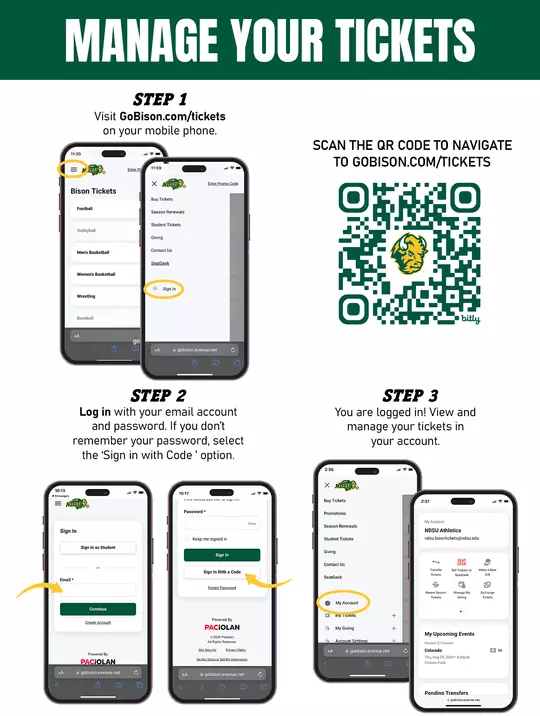
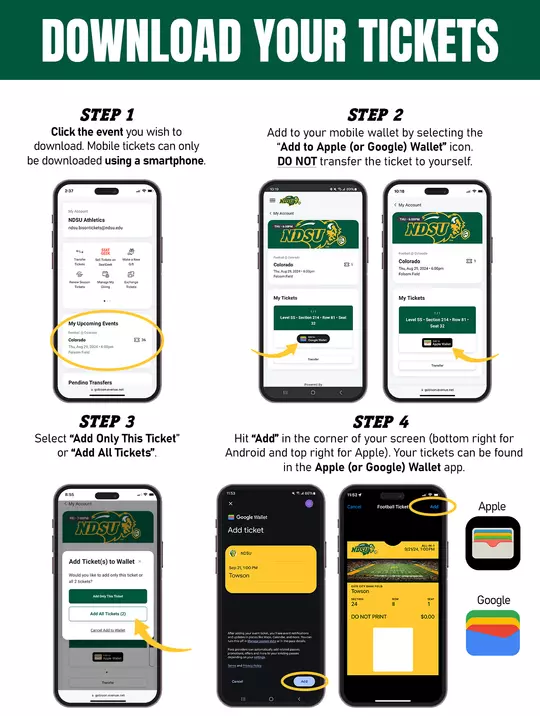
Frequently Asked Questions:
Mobile tickets are tickets delivered in a Mobile PDF or Passbook format specifically designed for smartphones. Mobile tickets are emailed directly to you immediately after your purchase. You will receive two emails after your purchase — one will be your tickets that can be scanned on your smartphone or added to Passbook and the second email will be your order confirmation email (does not include tickets). In addition to both emails, you have the option to opt in to have your tickets sent via text.
Adopting mobile ticketing is all about improving the fan experience. Mobile ticketing increases the security of the ticket management and event entry process. It also eliminates the need to print your tickets. Simply present your smartphone with your mobile tickets at the gate.
Mobile ticketing also provides:
- Quick and convenient entry into the venue
- Reduced risk of lost, stolen or counterfeit tickets
- Avoid waiting in "Will Call" lines to pick up your tickets
- Prevent your tickets from getting lost in the mail
- Manage, transfer or sell your tickets at any time directly from your smartphone
Your ticket has a valid QR Code and it will appear 48-hours before the event start time.
No. QR Codes must be scanned from your smart phone. If you print it off you will be redirected to the Bison Ticket Office for a new ticket.
- Make sure you have used the correct email address.
- Check your junk mail folder.
- Make sure that your spam guard and junk mail settings allow you to receive emails with attachments.
- Be sure to add our email address, ndsu.bisontickets@ndsu.edu, to your list of trusted email addresses.
- Please allow at least one hour for your emails to arrive.
Simply log in to your Bison Ticket Account to reissue your tickets and receive a new email.
If arriving at different times, you will need to transfer a ticket to each member of your party. This will allow you and your guest(s) to arrive at the venue at your own convenience. Once the ticket transfer offer has been sent to your guest(s) they will receive an email instructing them to accept the tickets. If they do not already have a Bison Ticket Account, they can easily create an account to accept the ticket offer. Once your guest(s) have accepted the transfer offer, they should download the tickets and add it to their digital wallet. Click HERE to learn more about ticket transfers.
Yes. You can view all of your tickets by swiping left or right on your smartphone. We highly encourage you to transfer a ticket to each member of your party to allow for the easiest entry and access throughout the venue. Click HERE to learn more about ticket transfers.
You will need to visit the ticket office at the venue on game day. You will be required to show a valid photo ID for the name on the ticket account.
Mobile tickets may only be used on devices with the Apple Wallet or Google Pay apps installed. For the best experience on an iPhone, we recommend that you update to the latest version of iOS. Apple Pay is supported on iOS 8.1 (and higher) on the iPhone 6 or higher. Google Pay is supported on devices using Android 5.0 (and higher). Many popular Android phones support Google Pay, including: Samsung Galaxy (S6 Edge or higher), LG (Q8, Q7, G7 ThinQ, V35 ThinQ), and Google Pixel (Pixel 1 or higher).
Please contact the Bison Ticket Office, Monday-Friday between the hours of 8:00 AM and 4:00 PM CST at 701-231-6378 or toll free at 1-888-231-6378 and by email ndsu.bisontickets@ndsu.edu for further assistance.
The Bison Ticket Office is located in the south lobby of the Scheels Center and Sanford Health Athletic Complex at 1600 University Dr. N., Fargo, ND 58102. Parking is available in designated 30-minute zones on either side of 16th Avenue.