

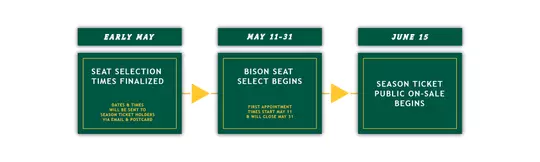
SELECT YOUR SEATS
- Selecting your 2026 Bison Football Season Tickets online is the most efficient and recommended method.
- LOG IN to the seat selection site early to familiarize yourself with the virtual venue. You will be able to view available seats in real time as other season ticket holders select their seats. You will also find important tech tips to help you prepare for online selection.

WHAT TO EXPECT
WHAT IS BISON SEAT SELECT?
Bison Seat Select
North Dakota State Athletics is pleased to present Bison Seat Select, the user-friendly online seat selection process providing priority access for NDSU Football.
For Current Season Ticket Holders
Bison Seat Select is the seat change process for NDSU Athletics. Upon receiving payment in full for season tickets and applicable contributions OR making a season ticket deposit by the deadline, patrons will be assigned a personalized selection date and time based on priority points rank as of May 1st, 2026. Patrons will receive selection information via email after the order deadlines and approximately one week prior to the start of the process.
Patrons will have the ability to move and improve existing seats and add additional season tickets.
Please note, Bison Seat Select is an optional benefit available to all current season ticket holders. If you do not want to move your season tickets, you do not have to log in to Bison Seat Select. As in prior years, simply continue to order your season tickets by the deadline.
Dates for Current & New Season Ticket Holders to be eligible for Bison Seat Select:
Bison Seat Select Key Dates | Football | |
| Current Season Ticket Order Deadline | April 1st | |
| Deposit Deadline | April 30th | |
| Bison Seat Select Live Date | May 11th-31st |
WHAT IF I MADE A DEPOSIT?
New Season Ticket Holders
Fans who make a deposit on or before April 30th will receive priority access to available season tickets prior to the general public. Patrons will use the Bison Seat Select process to view and select seats. Bison Seat Select is the seat change process for NDSU Athletics. Upon making a season ticket deposit by the deadline, patrons will be assigned a personalized selection date and time based on priority points rank as of May 1st, 2026. Patrons will receive selection information via email after the order deadline and approximately one week prior to the start of the process. You can make a season ticket deposit by clicking HERE.
Patrons will have the ability to view a 3-D render of the Fargodome and see what their view could look like for various seating locations.
Dates for New Season Ticket Holders to be eligible for Bison Seat Select:
Bison Seat Select Key Dates | Football | |
| Deposit Deadline | April 30th | |
| Bison Seat Select Live Date | May 11th-31st |
WHAT IF I WANT TO SIT WITH SOMEONE WHO HAS A DIFFERENT APPOINTMENT TIME?
Each person is assigned a different selection time. To choose your seats together you must do so on or after the latest appointment time in your group. You may use any of the following methods:
1. Online: Everyone in your group can login during the start of the latest appointment time and communicate with each other to select your seats. This method may be more difficult the larger your group is.
2. In Person: Your group can stop by the ticket office located in the south lobby of the SHAC on or after the latest appointment time within your group. A ticket office representative will discuss availability and assist you in choosing your seats.
STEP-BY-STEP
1) Log In
- To access Bison Seat Select, patrons will login to their online account with the NDSU Athletic Department, which patrons already use to order season tickets and process contributions. Patrons will use their email address, and previously established password to access Bison Seat Select. We strongly encourage patrons to ensure they can login to their online account prior to the start of Bison Seat Select. If you have not activated your account, log in using the email listed on your invoice and select ‘sign-in with a code' to access your account.
- Upon logging in, click on the ‘Bison Seat Select’ link in the upper right hand corner of the My Tickets page.
2) View Seats
- When you roll over a section, detailed information will appear in the rotating window, including the section number and any special notations. To view available seat inventory, click on any section.* Please note the key on the right side of the screen.
3) Select Seats
- This section detail shows you all seats in a specific section. Green dots represent available seats. Red dots represent seats that have been previously selected or are unavailable. Purple dots represent held seats just selected by someone else and awaiting finalization. Seats that you are selecting will turn blue. To see a virtual, panoramic view of the field from an area near a selected seat, click on the "Seat View" button. View adjoining sections by clicking on the "Go To" buttons at the top of the section image. You can return to the overhead view of the stadium by clicking on the "Overhead Map" button. You will not be able to reserve or select seats until your designated selection time begins.
- Moving Current Seats
- Please note your current seats are listed in the gray box labeled "Current Seats." To move seats, first choose the new location by clicking on any available (green) seat. Once selected, your new seats will display in the Shopping Cart on the left, and the seat dot will turn blue. To change a selection, unclick the seat dot or click the red "X" next to the selection in your cart. Once your cart is full and you are satisfied with your new seat selections, you may continue. You may release your old seats by clicking the red "X" next to them, or you may release seats on the next page. Click "Submit Selection" below the Shopping Cart to review your final selections.
- Selecting New Or Additional Seats
- To select new or additional seats, click on any available seat (shown in green). When you click on a seat, your selected seats will display in the Shopping Cart on the left and the seat dot will turn blue. To change a selection, unclick the seat dot or click the red "X" next to the selection in the Shopping cart. Once you have completed your selection, click "Submit Selection." This will prompt you to a "Review Selection" screen.
- Tip: If you are adding to your existing seats, you will not need to make any changes to the "Current Seats" box above the Shopping Cart. If you are selecting new seats for the first time, the Current Seats box will remain empty. To change a selection, unclick the seat dot or click the red "X" next to the selection in the Shopping Cart. Once you have completed your selection, click "Submit Selection." This will prompt you to a "Review Selection" screen.
4) Review & Confirm Seats
- Carefully review your selections before continuing. If you are relocating your seats, you may need to release your current seats, which will appear in the box on the left. Once you release your current seats they will be immediately available to other members making selections. When your selection is complete, click on "Approve Selection" to proceed.
- You will be notified if your final selections cause any change to your season ticket total. You must agree with the changes to continue. The final confirmation page will display your new selections. To continue, click on the "Go to Payment" button (which is required to complete your selections(s), whether payment is due or not). Note, you will not be able to make changes after this step.
- By selecting seats, you acknowledge and accept responsibility for the purchase of these seats as a benefit of your donor status. At a minimum, you must maintain the current annual giving level used to establish your rankings for seat selection.
5) Place Your Order & Complete Payment
- After confirming your selections, you will be directed to the Payment Screen. At this time, in order to FINALIZE YOUR SELECTIONS, you must click on "PLACE YOUR ORDER". If no payment is due, you must still click on "PLACE YOUR ORDER" to complete the process.
- Upon completion, you will also be sent a confirmation email to the email address associated with your account.
SEAT SELECTION
- Every account that has paid in full or on a bill plan by April 1st receives a time, assigned in priority rank order, when their seat selection window will open. Any time after your selection window opens, you may select your seats in any available area of the Fargodome. There is no time limit. However, please be aware that other people will be able to select seats as their appointment windows open, so we urge you to select as close to your assigned time as possible to ensure the best availability. Your selection window remains open until your seats are selected and payment is complete.
- In an effort to maximize seat availability for all fans, no one will be allowed to leave a single empty seat between the aisle or any other seats. This is a strict and non-negotiable policy.
- The Fargodome will not be available to tour in person. The best way to preview seating options and views is through the Virtual Venue.
- If you decide to keep your original seats during your appointment, you may simply exit the system. No changes will be made to your seats without completing the process.
GENERAL INFORMATION
- If you change the location of your seats and complete the online process, the transaction is final. Do not release your original seats unless you are certain you want to change seating. We cannot restore your original seats.
- Based on availability, the quantity limits by area will continue to apply.
- Newly upgraded seats are not eligible for season ticket transfers for the 2026-27 NDSU Football Season.
.